How to Turn a Freestyle Rap Into a Full Suno Song (Free Tool)
2026-07-19
Last updated: July 19, 2026
Quick Answer: You can transform your freestyle raps into complete, structured songs using RhymeItNow's free Freestyle Challenge tool, which now includes a "Full Song" mode for generating Verse 1, Hook, Verse 2, and Outro lyrics. This feature uniquely provides a tailored Suno music production prompt based on your specific generated lyrics, allowing you to create full, professionally sounding tracks without needing paid AI prompt tools.
Key Takeaways:
-
RhymeItNow's Freestyle Challenge now offers a "Full Song" mode for structured lyric generation.
-
This mode expands your freestyle into Verse 1, Hook, Verse 2, and Outro.
-
An enhanced style picker includes 15 genres, such as Trap, Boom Bap, UK Drill, and G-funk.
-
The tool generates a custom Suno Style Prompt, uniquely tailored to your actual lyrics.
-
This contextual prompt generation is a free alternative to many paid Suno prompt services.
-
You can select specific moods and vocal characteristics to guide your song's creation.
-
The process involves selecting your song ingredients, generating lyrics, and then pasting the bespoke prompt into Suno.
-
RhymeItNow.com/freestyle is the free platform for this transformation.
What is Suno and How Does it Work?
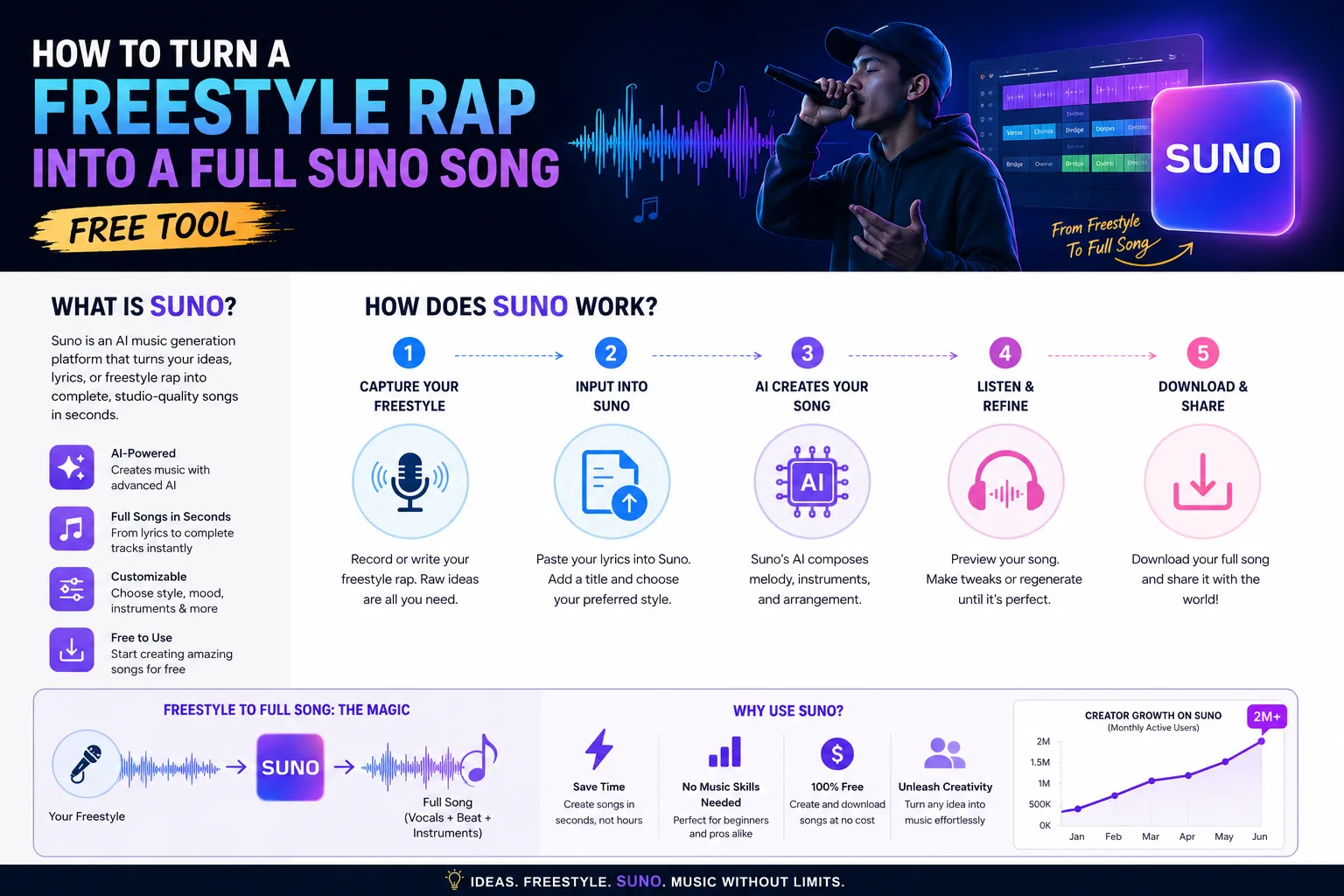
Suno is an artificial intelligence-powered music generation platform that creates full songs, complete with vocals, instrumentation, and lyrics, from simple text prompts. Users provide a textual description of the song they want, including genre, mood, lyrical content, and vocal style, and Suno's AI then synthesizes a unique audio track. It works by taking your input and translating it into musical elements, allowing for rapid song prototyping and creation for individuals without traditional music production skills.
The core of Suno's functionality lies in its ability to understand natural language prompts. When you give it a prompt like "a soulful R&B track about lost love, female vocals, smooth saxophone," Suno processes this information and generates a song that attempts to match these parameters. It handles the composition, arrangement, and vocal performance, making it a powerful tool for aspiring artists or those looking to quickly bring musical ideas to life. The output typically consists of a short song segment, which can then be extended or refined through further prompting.
Is There a Free Version of Suno, and What Are Its Limitations?
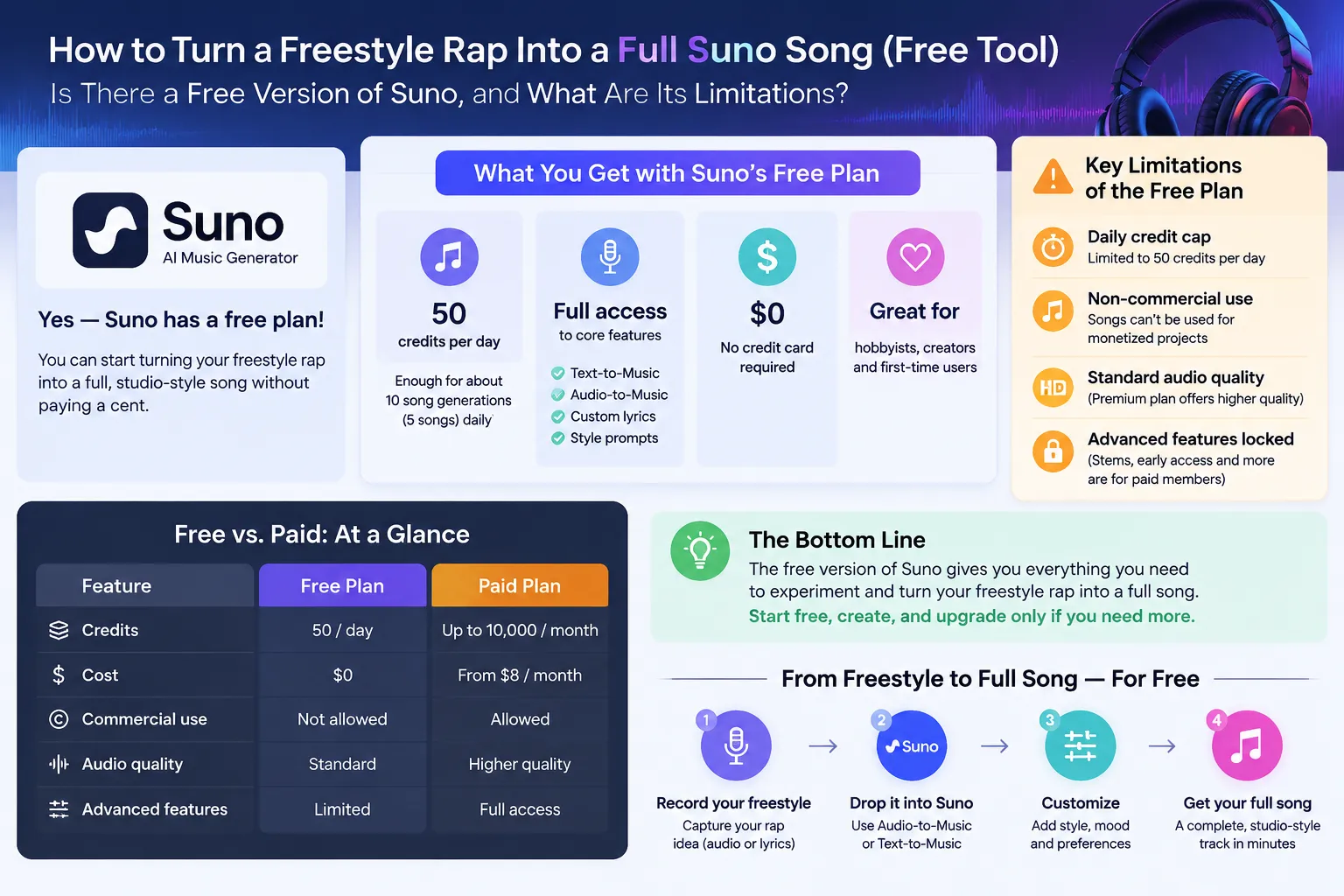
Yes, Suno offers a free tier, but it comes with certain limitations regarding daily credit usage and commercial rights. The free version typically provides a set number of daily credits that allow users to generate a limited number of songs or song segments. Once these credits are depleted, you'll need to wait for them to reset, or upgrade to a paid plan for more generations. While the free tier is excellent for experimentation and personal use, it generally restricts commercial use of the generated music.
For serious artists or those planning to monetize their work, understanding these limitations is crucial. The free version might not grant full commercial rights, meaning you might not be able to use the music for commercial projects like albums, advertisements, or public performances without purchasing a license or upgrading to a paid subscription. This makes the free version ideal for exploring the platform's capabilities and drafting ideas, but often insufficient for professional production.
How to Turn a Freestyle Rap Into a Full Suno Song (Free Tool) with RhymeItNow
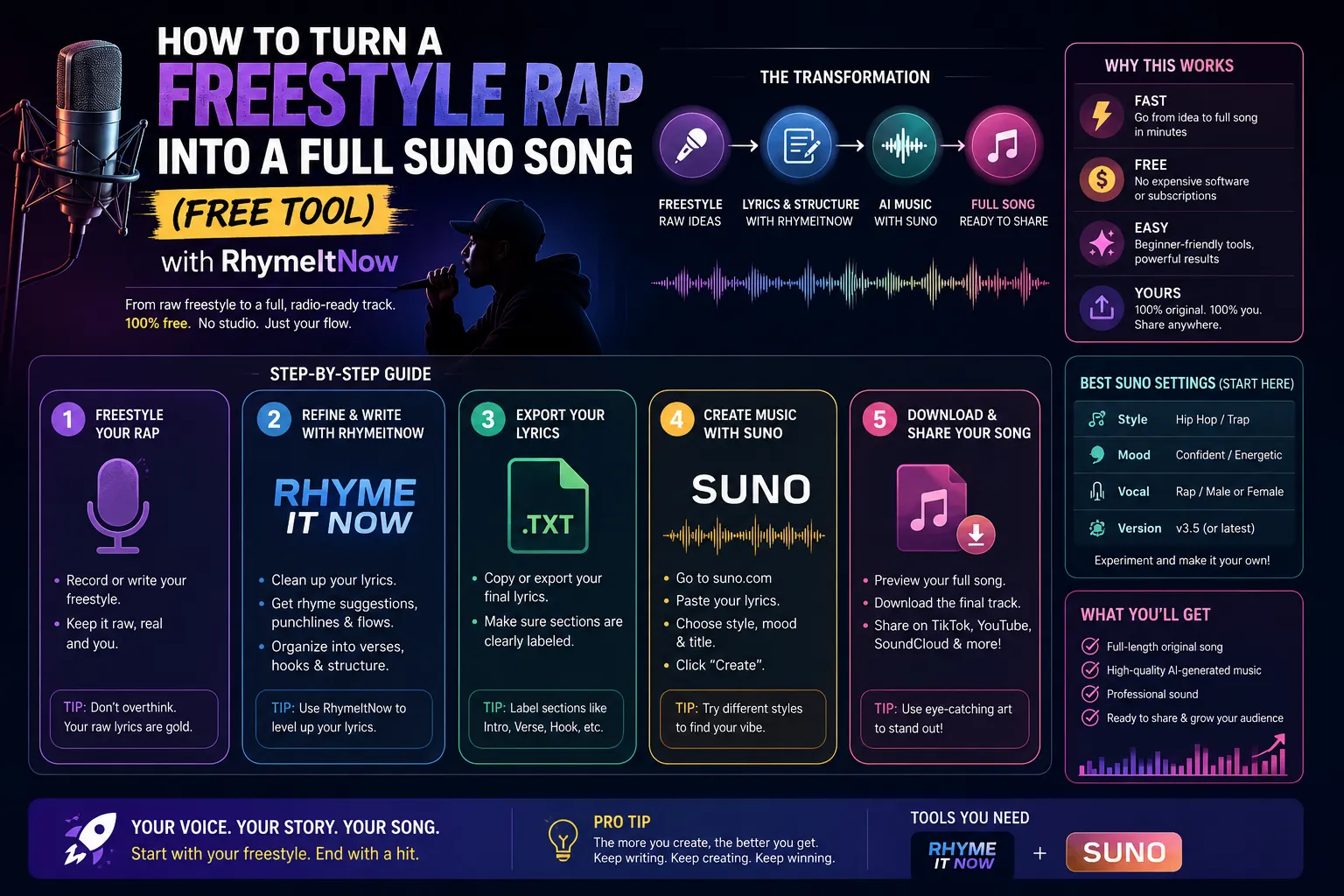
Turning your freestyle rap into a complete Suno song involves a straightforward, step-by-step process using RhymeItNow's enhanced Freestyle Challenge tool. The key is to leverage the new "Full Song" mode and the custom Suno Style Prompt feature on RhymeItNow.com/freestyle to get contextually relevant lyrics and a powerful prompt.
Here's the detailed walkthrough:
-
Visit RhymeItNow's Freestyle Challenge: Navigate to rhymeitnow.com/freestyle. This is your starting point for transforming your raw ideas into structured lyrics.
-
Pick Your Ingredients:
-
Main Topic/Word: Enter the core theme or a key word from your freestyle. This helps the AI capture the essence of your rap. For example, if your freestyle is about overcoming adversity, you might type "challenge" or "victory." Need inspiration? Check out words like Rhymes for "rage" or Rhymes for "mind".
-
Style Picker: Choose from the expanded list of 15 genres to match your rap's vibe. Options include:
-
Trap 🎧
-
Boom Bap 🎤
-
Melodic 🎶
-
Aggressive 🔥
-
Storytelling 📖
-
UK Drill 🇬🇧
-
Chicago Drill 🏙️
-
G-funk 🚗
-
Cloud Rap ☁️
-
Mumble Rap 🗣️
-
Grime 💥
-
Latin Trap 🌶️
-
Afroswing 🌍
-
Chopped & Screwed 🐢
-
Phonk 🌑
-
-
Mood and Vocals Picker: Refine the emotional tone and vocal style. Options might include "Energetic Male Vocals," "Smooth Female Vocals," "Dark and Brooding," or "Uplifting."
-
-
Generate Freestyle Lyrics: Click the "Generate Freestyle" button. The tool will produce initial freestyle lyrics based on your selected parameters.
-
Choose "Full Song" Mode: Once you have your initial freestyle, select the new "Full Song" mode. This is where RhymeItNow shines, transforming your freestyle concept into a complete song structure:
-
Verse 1: Establishes the theme.
-
Hook: The catchy, memorable chorus.
-
Verse 2: Develops the narrative or theme further.
-
Outro: Concludes the song.
This structured output ensures your rap has a professional song format.
-
-
Get Your Tailored Suno Style Prompt: This is the game-changer! RhymeItNow's new feature doesn't just give you a generic genre template. Instead, it reads your actual generated lyrics from the "Full Song" mode and produces a custom, highly specific Suno music production prompt. This prompt includes details about your chosen genre, mood, vocal style, and unique lyrical content, ensuring Suno generates music that truly fits your words.
-
Copy and Paste into Suno: Copy the entire generated Suno Style Prompt. Go to Suno's platform, paste the prompt into the creation field, and hit "Generate." Suno will then create a full song, complete with vocals, that aligns perfectly with your freestyle lyrics and chosen style.
By using RhymeItNow, you bypass the guesswork of crafting effective Suno prompts, receiving a free, contextual prompt that maximizes the quality and relevance of your AI-generated track. This makes the journey from a raw freestyle idea to a polished song incredibly accessible.
Can I Just Type Out My Rap Lyrics Instead of Recording?
Absolutely, you can simply type out your rap lyrics directly into RhymeItNow's Freestyle Challenge tool. There's no requirement to record your voice first. The platform is designed to help you structure and refine written lyrics into a full song, making it ideal for songwriters, poets, and rappers who prefer to work with text.
The advantage of typing your lyrics or generating them directly within RhymeItNow is that it streamlines the process of getting a structured song. Instead of focusing on recording quality, you can concentrate solely on the creative aspects of your words and themes. This text-based approach is particularly helpful when you're in the initial stages of songwriting and just want to see how your ideas can be fleshed out into a full track.
How Do I Make My Suno Song Sound Like a Professional Track?
To make your Suno song sound professional, focus on refining your lyrical input, being specific with your style prompts, and utilizing Suno's iterative generation capabilities. While Suno offers incredible automation, the quality of the output often depends on the clarity and detail of your initial instructions.
Here are key tips:
-
Use RhymeItNow's Tailored Prompts: As mentioned, RhymeItNow provides a custom Suno Style Prompt that is already context-aware of your lyrics and genre. This is a massive step towards professionalism.
-
Be Specific with Mood and Vocals: Don't just pick "Rap." Specify "Aggressive Trap with deep male vocals" or "Smooth G-funk with laid-back female harmonies." The more detail, the better.
-
Structure Your Lyrics Thoughtfully: Even within a freestyle context, consider a coherent narrative or theme. The "Full Song" mode on RhymeItNow helps with Verse 1, Hook, Verse 2, Outro structure, which is crucial for a professional feel.
-
Iterate and Extend: Suno often generates short segments. Use the "Extend" feature to build out longer tracks. Don't be afraid to generate multiple versions and pick the best ones to chain together.
-
Experiment with Custom Mode (in Suno): If you're using Suno directly, its Custom Mode allows you to input specific musical styles, instruments, and vocal instructions alongside your lyrics. This gives you more granular control.
-
Post-Production (Optional but Recommended): For truly professional results, consider taking your Suno-generated audio into a Digital Audio Workstation (DAW) like Ableton Live, Logic Pro, or GarageBand. Here, you can add effects, mix, master, and potentially layer live instruments or additional vocal tracks to enhance the sound quality beyond what AI alone can do. This final touch can elevate your track significantly.
What Are Some Common Mistakes When Using Suno for Rap?
Common mistakes when using Suno for rap often stem from generic prompts, unclear lyrical structure, and a lack of iteration. Users might expect a perfect song on the first try with minimal input, leading to disappointing results.
Here's a breakdown of pitfalls to avoid:
-
Vague Prompts: Simply typing "rap song" won't yield specific results. Be precise with genre (e.g., "Boom Bap," "UK Drill"), mood ("gritty," "celebratory"), and vocal style ("energetic male rapper," "melancholic female vocalist").
-
Ignoring Lyrical Flow and Rhyme: While RhymeItNow helps with structure, if your initial freestyle or typed lyrics lack a natural rhythm or coherent [Rhymes for "flow"](https://rhymeitnow.com/rhymes-for/flow) the AI might struggle to create a musically fitting track.
-
Overlooking Song Structure: Failing to consider verses, hooks, and outros can result in fragmented or repetitive outputs. RhymeItNow's "Full Song" mode directly addresses this by providing a structured foundation.
-
Expecting a Mastered Track Instantly: Suno generates high-quality demos, but they aren't always professionally mixed and mastered. Additional post-production might be necessary for commercial release.
-
Not Iterating: Don't settle for the first generation. Suno often produces variations. Generate several and select the best parts, or try slightly altering your prompt to guide the AI.
-
Forgetting to Utilize Custom Mode (in Suno): If you're not using RhymeItNow's custom prompt, relying solely on generic prompts in Suno's simple mode can limit creative control. Custom mode allows for much more detailed instruction.
-
Mismanaging Commercial Rights: Assuming free tier creations have full commercial rights is a common error. Always check Suno's terms of service regarding usage rights, especially if you plan to monetize your music.
What if My Freestyle Doesn't Fit the Song Structure Well?
If your initial freestyle doesn't naturally fit into a traditional song structure, RhymeItNow's "Full Song" mode is specifically designed to help bridge that gap. The tool will take your core ideas and automatically organize them into logical Verse 1, Hook, Verse 2, and Outro sections, even if your original rap was more stream-of-consciousness.
Here’s how to handle it:
-
Focus on Core Themes: Even if your freestyle jumps between ideas, identify the central message or emotion. Input this into RhymeItNow as your main topic.
-
Trust the AI's Structuring: Let the "Full Song" mode do its job. It's trained on countless song structures and will attempt to logically flow your concepts into the standard format. You can then edit and refine the generated lyrics if needed.
-
Edit and Rephrase: Once RhymeItNow provides the structured lyrics, review them. If a particular line feels out of place in a verse or hook, rephrase it to better suit the section's purpose. For example, a hook needs to be memorable and impactful, while verses tell the story. You might find some good Rhymes for "story" or Rhymes for "message" to help.
-
Use Inspiration, Not Replication: View the generated structure as a strong starting point, not a rigid final product. It’s a canvas for your creativity.
Are There Alternatives to Suno for Turning Rap into Songs?
Yes, several other AI-powered tools and platforms can assist in turning rap lyrics or ideas into songs, though their feature sets and output quality may vary. While Suno is a prominent player, options exist for different stages of the music production process, from lyric generation to full audio creation.
Alternatives include:
-
Google's MusicLM/AudioLM: While not directly user-facing in the same way as Suno, these research projects demonstrate similar capabilities in generating music from text prompts. Access might be limited.
-
AI Lyric Generators (like RhymeItNow for lyrics): Many tools focus solely on generating lyrics, rhymes, or song ideas, allowing you to then take those lyrics to a separate music production AI or a human producer. RhymeItNow.com is a prime example of this, specializing in generating structured lyrics and providing custom Suno prompts.
-
Text-to-Speech (TTS) with Music Backing: Some platforms allow you to input lyrics and choose a vocal style, then overlay it onto royalty-free or AI-generated instrumental tracks. This is less integrated than Suno but offers more control over individual components.
-
AI Beat Generators: Tools like Amper Music, AIVA, or Soundraw focus on creating instrumental tracks based on mood, genre, and tempo. You could generate a beat here and then manually add your vocals (AI-generated or your own).
-
"Collaborative" AI Tools: Some platforms aim to be more of a co-creator, suggesting chords, melodies, or drum patterns based on your input, requiring more hands-on involvement than Suno's full song generation.
Each alternative offers a different approach, with Suno and RhymeItNow providing one of the most streamlined ways to go from rap idea to a full, vocalized track.
How Much Does Suno Pro Cost?
Suno's pricing structure for its Pro plans can vary, but typically offers tiers that provide more credits, advanced features, and clearer commercial rights. While the free tier provides limited daily generations, paid plans are designed for users who require more extensive use or wish to monetize their creations.
As of 2026, a typical Suno Pro plan might cost anywhere from $8 to $30+ per month, depending on the number of credits, concurrent generation capabilities, and specific commercial licensing details. Higher tiers usually offer:
-
Significantly more monthly credits.
-
Faster generation times.
-
Exclusive or priority access to new features.
-
Clear commercial rights for music created, allowing for monetization on platforms like YouTube, Spotify, etc.
It's always recommended to check Suno's official website for the most current and accurate pricing information, as plans and features can be updated.
Can I Use Suno to Make a Full Album?
Yes, in principle, you can use Suno to generate tracks for a full album, but it requires strategic planning and iterative use of the platform. Since Suno primarily generates shorter song segments, creating an entire album means producing multiple individual tracks and potentially extending or linking them together.
To make an album:
-
Develop a Cohesive Theme: Even if each song is generated separately, an album needs a consistent theme, mood, or story. Plan your tracklist and the general vibe for each song.
-
Generate Tracks Individually: Use RhymeItNow's "Full Song" mode for each album track, getting tailored prompts. Then, generate each song in Suno.
-
Extend and Refine: Suno often creates 30-60 second segments. Use the "Extend" feature to build out full-length songs (typically 2-4 minutes). This involves generating subsequent segments that continue the initial idea.
-
Maintain Consistency: When extending or generating new tracks, try to use consistent prompts for vocal style, instrumentation, and mood to ensure the album sounds cohesive.
-
Post-Production is Key: For an album to sound professional, you'll almost certainly need to use a Digital Audio Workstation (DAW) to mix, master, and potentially add transitions between tracks. This stage is crucial for an album's overall polish.
-
Manage Credits: Producing a full album will consume a significant number of credits. A paid Suno plan would be essential for this scale of production.
Is Suno Good for All Rap Styles, Like Mumble Rap or Battle Rap?
Suno is capable of generating music for a wide range of rap styles, including specialized genres like Mumble Rap or Battle Rap, provided you give it sufficiently clear and specific prompts. The key is to describe the characteristics of that style accurately.
-
Mumble Rap: For mumble rap, you would specify the genre (e.g., "Mumble Rap," "Cloud Rap") and vocal style. Suno's AI can emulate the melodic, often autotuned, and sometimes intentionally indistinct vocal delivery. Your lyrics, generated by RhymeItNow in "Mumble Rap" style, would also reflect this, focusing on sounds and vibe more than intricate wordplay.
-
Battle Rap: For battle rap, the focus is on aggressive, punchline-heavy lyrics and a hard-hitting beat. You would select "Aggressive" or specific drill genres (UK Drill, Chicago Drill) in RhymeItNow, and specify "aggressive male vocals" or similar in your prompt. The lyrical content itself, which you input or generate with RhymeItNow, would need to contain disses, boasts, and intricate Rhymes for "rhyme" to truly capture the battle rap essence.
Suno's versatility comes from its large training dataset, which includes diverse musical genres and vocal styles. The better you describe what you want, the better it can deliver.
What if Suno Misinterprets My Lyrics?
If Suno misinterprets your lyrics, it typically means the prompt wasn't clear enough or the AI couldn't effectively integrate the lyrical content with the chosen musical style. This can lead to awkward phrasing, incorrect emphasis, or music that doesn't match the song's intent.
Here's how to address misinterpretations:
-
Refine Your RhymeItNow Prompt: Before even going to Suno, review the lyrics generated by RhymeItNow. Ensure they flow naturally and the meaning is clear. Edit them if necessary. The custom Suno Style Prompt from RhymeItNow is designed to minimize misinterpretation by being highly contextual.
-
Simplify Complex Language: AI can sometimes struggle with highly abstract metaphors, slang, or very dense lyrical passages. Try simplifying your language or breaking down complex ideas into more direct lines.
-
Add Context to the Suno Prompt: If you're using Suno directly (not just the RhymeItNow prompt), add specific instructions about how certain lines should be delivered or the emotion behind them. For example, "[Verse 1] (aggressive delivery) [lyrics here]"
-
Adjust Style/Mood: Sometimes, the misinterpretation isn't the lyrics themselves, but the way the AI sets them to music. If your lyrics are serious but Suno makes them sound cheerful, adjust the mood or genre selection.
-
Iterate and Regenerate: Don't be afraid to try generating the song multiple times with slightly altered prompts. Small tweaks can sometimes lead to significant improvements.
-
Manual Edits (in DAW): For persistent issues, you might need to export the audio and use a DAW to manually edit vocal timing, pitch, or add effects to correct misinterpretations.
How Do I Export My Finished Suno Song?
Exporting your finished Suno song is a straightforward process within the platform once your track has been generated. Suno typically provides options to download your creations in standard audio formats.
To export your Suno song:
-
Locate Your Song: After a song or segment has been generated, it will appear in your library or on the creation screen.
-
Find the Download Option: Look for a download icon (often an arrow pointing down) or a "Download" button associated with your track. This is usually near the play button or in a 'more options' menu (e.g., three dots).
-
Select Format: Suno usually offers to download in MP3 format, which is widely compatible. Some plans might offer higher quality formats like WAV, but MP3 is standard.
-
Save to Your Device: Click the download button, and your browser will prompt you to save the audio file to your computer or mobile device.
Once downloaded, you can use your MP3 file for personal listening, share it, or import it into a Digital Audio Workstation (DAW) for further mixing, mastering, or integration into other projects.
Related Reading:
Conclusion
The journey from a raw freestyle rap to a fully produced song is now more accessible than ever, thanks to innovative tools like RhymeItNow's Freestyle Challenge and Suno AI. By leveraging RhymeItNow's new "Full Song" mode and its unique, context-aware Suno Style Prompt feature, artists, poets, and aspiring rappers can effortlessly structure their lyrics into Verse 1, Hook, Verse 2, and Outro formats. This free tool not only streamlines the creative process but also provides a tailored prompt that ensures Suno generates music perfectly matched to your specific lyrical content and chosen genre, from Trap to G-funk to UK Drill.
This approach eliminates the guesswork of crafting effective AI prompts, offering a powerful, free alternative to paid services. Whether you're refining your flow, exploring new genres, or aiming to create a complete album, the integration of RhymeItNow with Suno empowers you to bring your musical visions to life with professional-sounding results. Don't let your freestyle ideas remain as fleeting thoughts; turn them into tangible, structured songs. Start transforming your raps today by visiting rhymeitnow.com/freestyle.
FAQ
Q: How does RhymeItNow's "Full Song" mode differ from a regular freestyle generator?
A: The "Full Song" mode on RhymeItNow structures your freestyle concepts into a complete song format, generating distinct lyrics for Verse 1, Hook, Verse 2, and Outro, unlike a regular generator that might produce an unstructured verse.
Q: Is RhymeItNow's Suno Style Prompt truly free?
A: Yes, the custom Suno Style Prompt generated by RhymeItNow's Freestyle Challenge tool is completely free to use.
Q: Can I use my own pre-written lyrics with RhymeItNow's Suno prompt feature?
A: You can type your pre-written lyrics or ideas into RhymeItNow, and the tool will help structure them and generate a tailored Suno prompt based on your input.
Q: What genres are available on RhymeItNow's style picker for rap?
A: RhymeItNow offers 15 rap genres, including Trap, Boom Bap, Melodic, Aggressive, Storytelling, UK Drill, Chicago Drill, G-funk, Cloud Rap, Mumble Rap, Grime, Latin Trap, Afroswing, Chopped & Screwed, and Phonk.
Q: Do I need a paid Suno subscription to use the prompts from RhymeItNow?
A: No, you can use the Suno Style Prompts from RhymeItNow with Suno's free tier, though paid Suno plans offer more credits and commercial rights.
Q: Can I edit the lyrics generated by RhymeItNow before pasting into Suno?
A: Yes, you are encouraged to edit and refine the lyrics generated by RhymeItNow to ensure they perfectly match your vision before using the Suno Style Prompt.
Q: How long does it take to turn a freestyle into a full song using this method?
A: The process can be very quick, often just a few minutes, from entering your initial idea on RhymeItNow to generating a song in Suno, depending on your prompt refinement.
Q: What if I want to change the mood or vocal style after generating lyrics on RhymeItNow?
A: You can easily go back to RhymeItNow, adjust the mood and vocals picker, regenerate the lyrics, and then get a new tailored Suno Style Prompt.
Q: Is the music generated by Suno copyright-free?
A: The commercial rights for music generated by Suno depend on your subscription tier. Free users typically have limited or no commercial rights; paid subscribers usually have broader commercial usage rights. Always check Suno's official terms.
Q: Can I use this tool on my phone?
A: Yes, RhymeItNow.com/freestyle is designed to be mobile-responsive, allowing you to generate lyrics and Suno prompts from your smartphone or tablet.
Q: Does RhymeItNow's prompt account for specific vocalists (e.g., male/female)?
A: Yes, RhymeItNow's style picker includes options for selecting vocal characteristics, and this information is incorporated into the tailored Suno Style Prompt.
Q: Will the Suno Style Prompt include instrumental details?
A: The tailored prompt will infer instrumental details based on your chosen genre and mood (e.g., "Trap beat with heavy 808s"), combined with your lyrical content.
Find the perfect rhyme for your next song
Try RhymeItNow →